How to mint a testnet NFT in 2026, now OpenSea has retired testnets
OpenSea retired its testnet marketplace on 23 July 2025, and testnets.opensea.io now redirects to a farewell notice. Minting a practice NFT is still free: deploy your own ERC-721 on Sepolia with MetaMask, OpenZeppelin's wizard and Remix. Every tool and faucet here was checked on 18 September 2026.
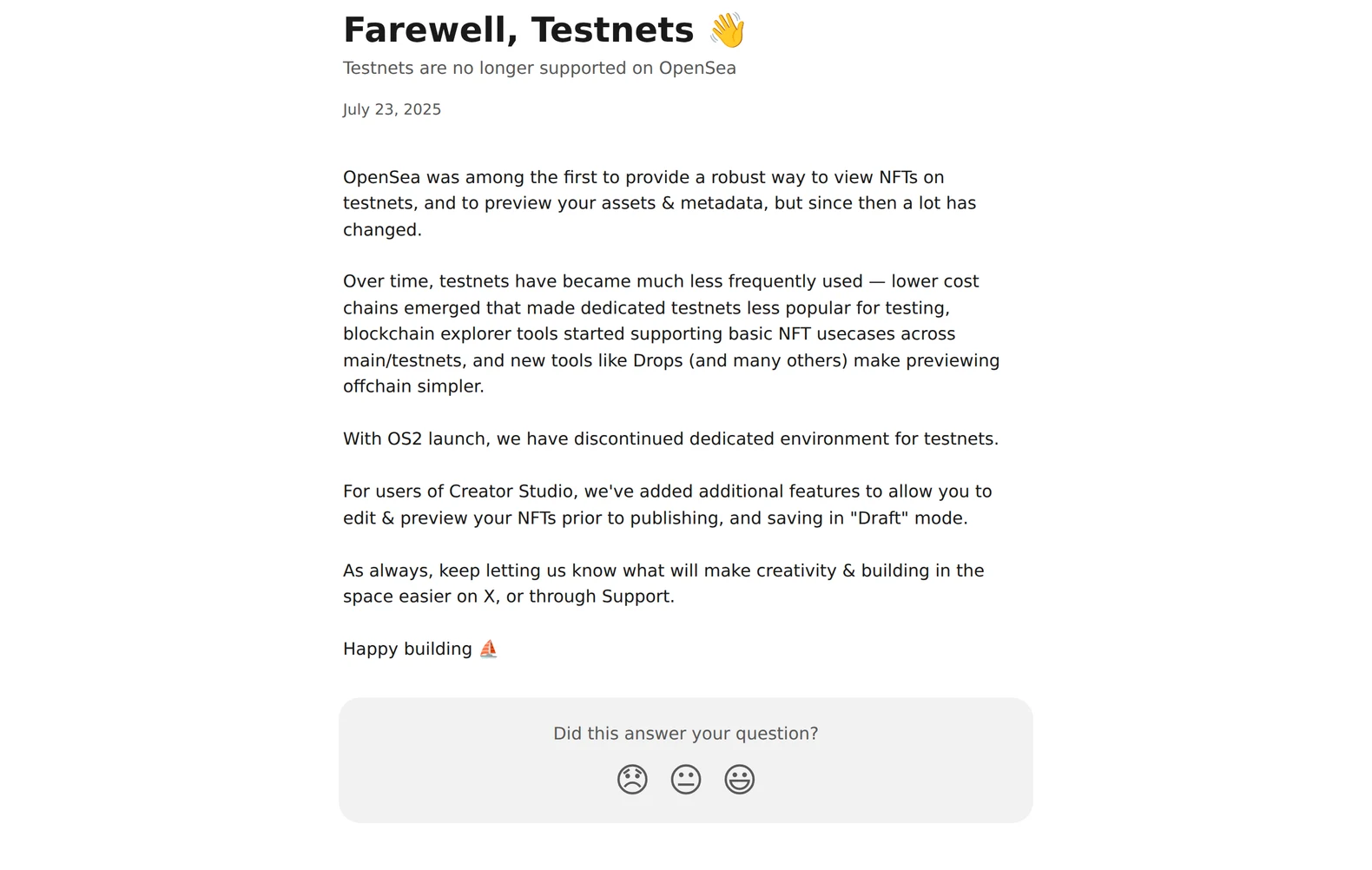
Most guides to minting a practice NFT still point at OpenSea’s testnet site. That route closed on 23 July 2025: OpenSea retired testnet support with the launch of its OS2 platform, under a support notice headed “Testnets are no longer supported on OpenSea”. The old address, testnets.opensea.io, now redirects to that farewell notice.
Minting a test NFT is still free, still legal, and still the best way to learn how the real thing works before any money is involved. What changed is the route. Instead of clicking “Create” on a marketplace, you deploy a small contract of your own on Sepolia, Ethereum’s test network for application work, and mint from that. It sounds harder than the marketplace route. It is about half an hour of clicking, everything runs in a browser, and you finish having done the thing that NFT projects actually do, because a marketplace mint was always someone else’s contract underneath.
Every tool, network and faucet below was checked working on 18 September 2026.
OpenSea retired its testnet in July 2025
The retirement came with OS2, the platform rebuild OpenSea rolled out through 2025. Its support note gives the reason: dedicated testnet infrastructure had become far less used as cheap layer 2 networks made experimenting on real chains affordable. OpenSea added one related feature alongside the retirement: Creator Studio gained a draft mode that lets you edit and preview an NFT before publishing. That covers checking how artwork and metadata look, and nothing in it touches a chain. For an actual on-chain mint, read on.
What you need
A browser, the MetaMask extension, and about half an hour. No real ETH and no money: the test currency comes free from faucets, and one mint costs a small fraction of what any faucet hands out. Install MetaMask from metamask.io, and keep the seed phrase on paper if the wallet might ever hold real funds.
Step 1: turn on Sepolia in MetaMask
Sepolia ships inside MetaMask, so there is nothing to add by hand. Open the network selector at the top left, switch on “Show test networks”, and pick Sepolia. The balance shows 0 SepoliaETH. The faucet fixes that.
Step 2: get free Sepolia ETH from a faucet
Three faucets checked today, with their conditions:
- Google Cloud’s Sepolia faucet asks for a Google sign-in and nothing else. Paste your wallet address, pick Sepolia in the dropdown, submit.
- Alchemy’s faucet pays 0.1 SepoliaETH every 24 hours. Its bot filters are the strictest of the three: the claiming address must hold at least 0.001 real ETH on mainnet, must have a history of real mainnet transactions, and must sit under a cap on testnet ETH already held. A brand-new empty wallet fails those, so start with one of the other two.
- QuickNode’s faucet pays a base amount every 12 hours with no account and no mainnet balance required.
Any one of them gives you more than enough for several mints.
Step 3: let OpenZeppelin’s wizard write the contract
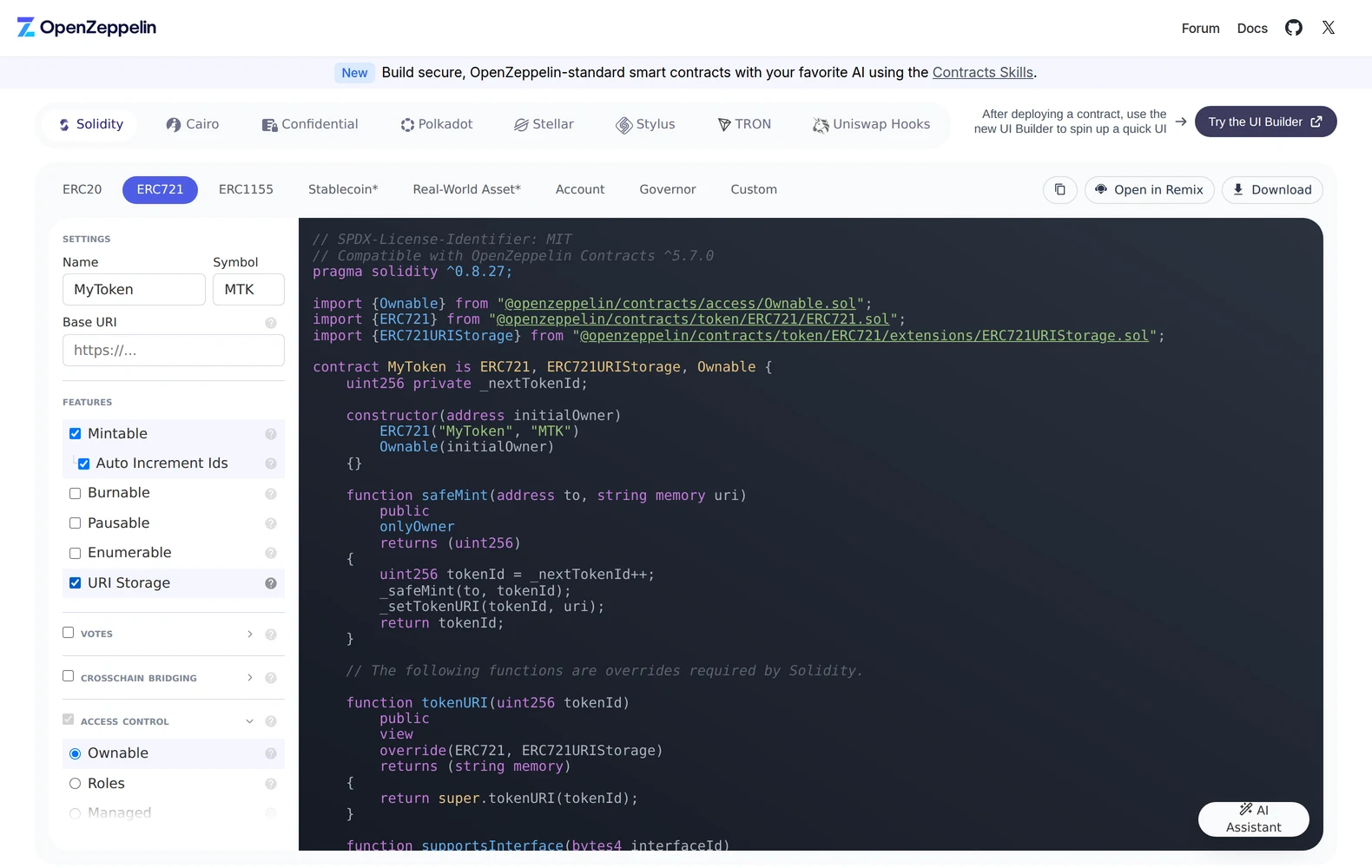
OpenZeppelin publishes the contract library most NFT projects build on, and its Contracts Wizard writes a correct contract from checkboxes.
- Open the wizard and pick the ERC721 tab. ERC-721 is the standard behind one-of-a-kind NFTs.
- Give it a name and a symbol.
- Tick Mintable, its sub-option Auto Increment Ids, and URI Storage. Mintable adds a function that creates tokens, Auto Increment Ids numbers them for you starting at 0, and URI Storage lets each token carry a link to its own metadata.
- The Solidity code updates on the right as you click. You never have to edit it.
- Press Open in Remix.
Step 4: deploy it from Remix
Remix is the Ethereum Foundation ecosystem’s browser IDE, and the wizard hands your contract straight into it.
- In the left toolbar, open Solidity Compiler and press Compile. A green tick appears on the icon.
- Open Deploy & Run Transactions. Under Environment, choose Injected Provider - MetaMask. MetaMask pops up to connect; approve it, and check the network it shows is Sepolia.
- The contract’s constructor wants an initial owner address. Paste your own wallet address, the one starting 0x.
- Press Deploy and confirm the transaction in MetaMask. The fee comes out of your faucet ETH.
After a few seconds the contract appears under “Deployed Contracts” with its own address. That address is yours: you just put a contract on a public network.
Step 5: mint the NFT
- Expand your deployed contract in Remix and find safeMint.
- It takes two inputs: to, which is your wallet address, and uri, which is a link to a JSON file describing the NFT, its name, description and image. For a first practice mint, any https link works; for a proper one, host a small JSON file anywhere public and link its address.
- Press transact and confirm in MetaMask.
That is a minted NFT, created by your own contract. To see it, open sepolia.etherscan.io, paste your wallet address, and look under the token holdings. MetaMask will also show it: on Sepolia, choose “Import NFT” and give it the contract address and token ID 0.
Which test network to use
Sepolia is the recommended network for application and contract work in ethereum.org’s developer documentation as of today. The other names you will meet do different jobs: Holesky was wound down during 2025, and Hoodi replaced it for validator and staking work, which is a separate world from minting tokens. The Ethereum Foundation has also set out a lifecycle in which Sepolia eventually gets a successor that runs alongside it before anything switches off. Its March 2025 plan gave Sepolia an expected end of life of September 2026; the core developers’ forum discussion has since moved the replacement to 2027, so the dates are still in motion. Check the networks page on ethereum.org the day you start; it carries the current state.
To preview artwork on OpenSea itself
If what you wanted from the old testnet was to see how a piece looks on a marketplace page, the draft mode OpenSea added to Creator Studio does that part: you can edit and preview an NFT before publishing, without paying anything. Publishing from there is a mainnet action with real fees, so stop at the preview while you are practising.
When you are ready for the real thing
The mainnet version of this is the same five steps with real ETH: the wizard, the deploy and the mint are identical, and the fees stop being pretend. At that point the seed phrase on paper stops being optional, and every address deserves a triple-check before anything moves. The practice run you just did is exactly the rehearsal for it.
Sources
- OpenSea Support, 'Farewell, Testnets', 23 July 2025support.opensea.io
- ethereum.org, 'Networks' (developer documentation)ethereum.org
- Ethereum Foundation blog, 'Holesky and Hoodi Testnet Updates', 18 March 2025blog.ethereum.org
- Fellowship of Ethereum Magicians, 'Sepolia testnet replacement & sunsetting' (Ethereum core developers' forum)ethereum-magicians.org
- OpenZeppelin, ERC-721 documentation, Contracts 5.xdocs.openzeppelin.com
- Alchemy, Sepolia faucetalchemy.com
- QuickNode, Sepolia faucetfaucet.quicknode.com
- Google Cloud, Web3 Sepolia faucetcloud.google.com