Hackers use developer accounts to poison trusted GitHub projects
PolinRider spreads through developer environments, while November’s wfx-loot campaign steals build credentials. How the attacks work, what to check and how to recover.

Listen to this articleListen
Attackers are using compromised developer accounts to plant malware in trusted GitHub projects, turning ordinary development work into a route to credentials and other repositories. The November wfx-loot campaign shows the scale: Aikido’s 12 November investigation counted permission-checking probes in more than 61,000 repositories, followed by a smaller set of credential-stealing executions.
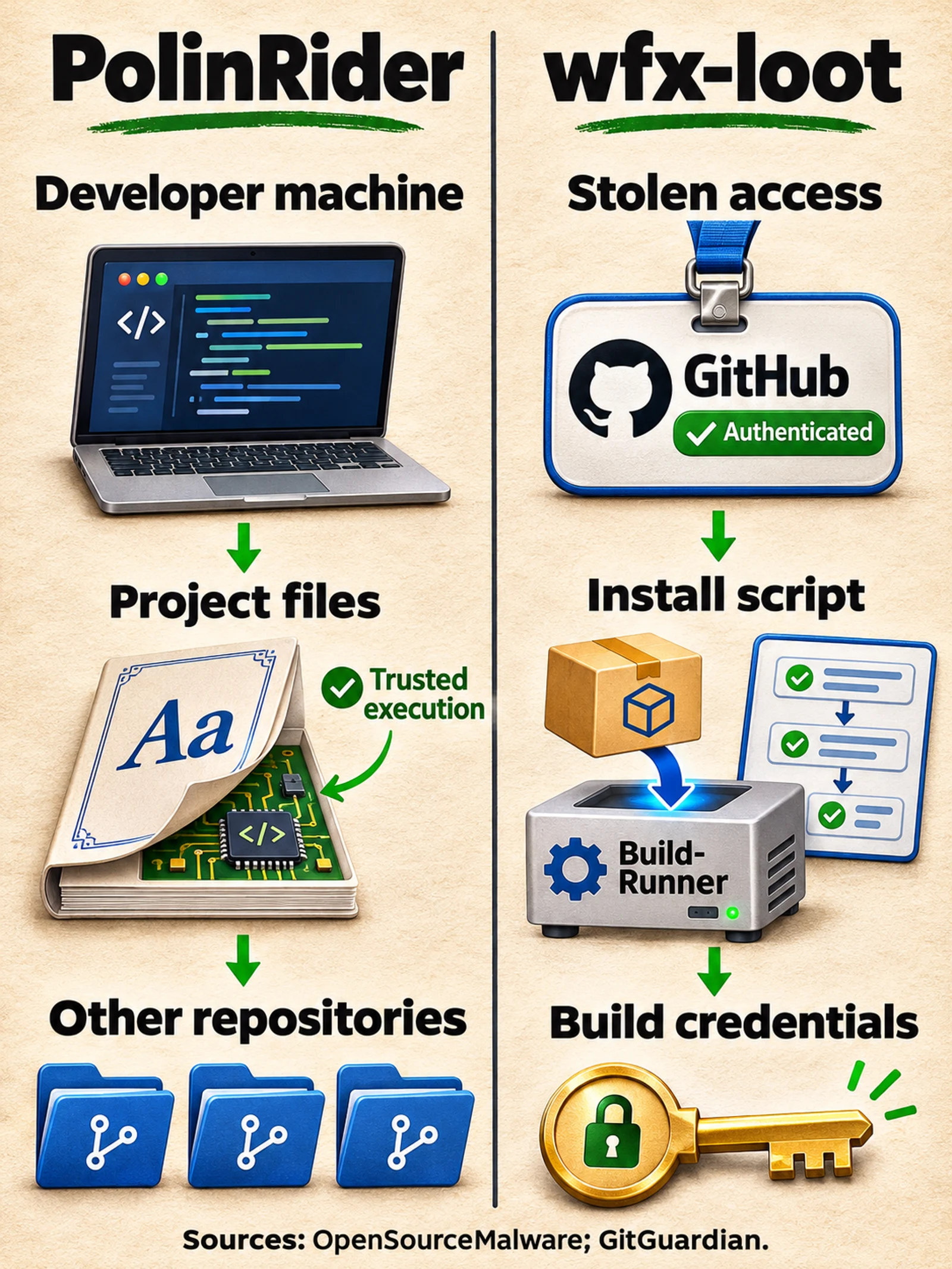
Alongside it, the longer-running PolinRider campaign spreads through infected developer environments and Git-hosted collaboration. Researchers link PolinRider to North Korean actors. They track wfx-loot separately. Both attacks exploit the access developers and their tools already hold. Aikido, Socket.
A trusted account gives malware a way in
A compromised GitHub identity can reach a developer’s own projects and repositories they help maintain. That access can include company work and automated publishing systems.
The wfx-loot operator tested those permissions with pull requests carrying the title docs: dependency audit notes, typically from a wfx-docs branch. Aikido reported the following snapshot on 12 November:
| Measure | Reported scope |
|---|---|
| Compromised accounts opening probes | 4,837 |
| Repositories receiving probes | 61,764 |
| Repositories reported to have executed the payload and lost credentials | More than 1,800 |
The largest figure measures permission checks. The theft figure describes a later stage of the attack. They are different measures of exposure. Aikido’s investigation.
StepSecurity also identified stolen developer and bot tokens in the campaign. GitHub’s authenticated push records can identify the account used to submit a change. Author names inside commits are editable metadata, so investigators need the hosting service’s records as well as the code history. StepSecurity’s research, OpenSourceMalware’s history guide.
A fake font can become an executable file
PolinRider hides executable JavaScript inside files presented as fonts or ordinary project configuration. OpenSourceMalware documented a pairing in which .vscode/tasks.json invokes Node.js against a fake .woff2 file when the project opens. Other variants place malicious code in build or lint configuration.
The filenames change. The researchers observed different font-like names, paths and extensions, including .llf. A useful investigation follows the execution command and examines the file’s actual contents. Legitimate projects also contain fonts and editor tasks, so a filename match needs context. OpenSourceMalware’s case study.
Current VS Code places conditions on automatic execution. Its documentation says automatic tasks run in trusted workspaces when automatic tasks are allowed. Restricted Mode prevents automatic task execution. Trusting a parent folder also trusts its subfolders, making broad trust settings consequential when unfamiliar repositories arrive beneath it. Microsoft’s task documentation, Workspace Trust.
That makes a request to trust a project or allow its tasks a security decision. A coding exercise, cloned project or dependency can introduce executable content before the developer has reviewed what it does.
An infected teammate can undo a cleanup
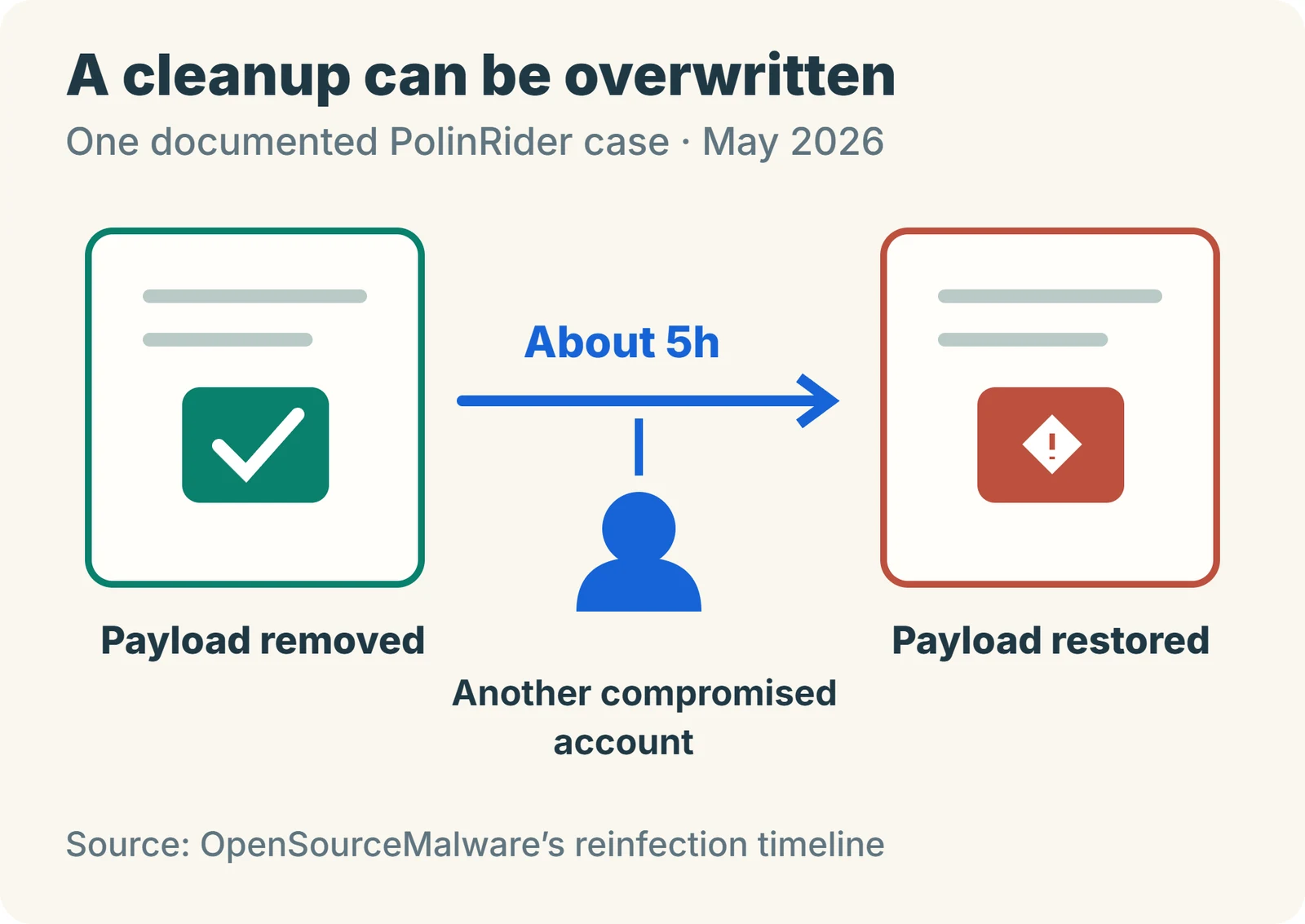
PolinRider’s persistence extends beyond the files visible in a repository. In OpenSourceMalware’s Binary-Mindz case study, cleanup changes were repeatedly overwritten through another contributor’s compromised account. One documented reinfection restored the payload about five hours after removal while retaining the cleanup commit’s title. The reinfection timeline.
A force-push can replace a branch’s existing history with a different chain of commits. Git author and committer timestamps can be chosen by whoever creates a commit. Investigators can compare them with GitHub-recorded push activity, workflow records and recovered commits to reconstruct when changes actually arrived. This helps distinguish a convincing-looking history from the sequence of events recorded by the hosting service. OpenSourceMalware’s history investigation guide.
The practical consequence is team-wide: every machine and identity capable of putting the payload back needs attention during recovery.
A normal dependency install can run the stealer
The wfx-loot campaign also exploited trust inside automated builds. npm, a JavaScript package manager, can run a package’s setup scripts during installation. GitGuardian documented four delivery forms: a new workflow, an added step in an existing workflow, an npm lifecycle hook, and code appended to a shell script the build already runs.
In the November workflow-file runs GitGuardian could still observe, GitHub held the runs for approval before execution. The npm-hook version took another route: a legitimate existing workflow installed dependencies, and that install invoked the malicious script. GitGuardian examined public logs from 19 repositories where the script ran; 18 reported a successful delivery of collected data. Those observations are a sample. GitGuardian’s investigation.
Build machines can hold cloud credentials, package-publishing tokens and API keys for AI services. StepSecurity found collection routines for those credential types, including credentials used by coding agents. StepSecurity.
StepSecurity documented rapid reverts and deleted workflow runs after injection. It also observed later variants sending stolen data through Telegram, giving defenders reason to examine process behaviour and outbound connections alongside known server addresses. StepSecurity.
Check what ran and what it could reach
Start by preserving evidence and checking the relevant execution paths:
- Developer machines: unexpected folder-open tasks, altered build configuration, executable text inside supposed fonts, and persistence introduced around the suspected compromise.
- Repositories: branches and tags, force-push activity, dependency-install hooks, workflow changes and recent publishing events.
- Accounts: active sessions, personal access tokens, SSH and deploy keys, authorised OAuth apps and GitHub Apps, and account or organisation audit records.
GitHub’s account-security guidance specifically calls for reviewing keys, application authorisations, webhooks, collaborators and recent commits. GitHub’s recovery checklist.
A gap in workflow run numbers can help locate suspicious activity. GitGuardian says it establishes that a run was created; audit evidence is needed to determine whether it was approved and executed. If the payload ran, scope the response around every credential the job or host could reach. GitGuardian.
Cloud access needs a separate review. Aikido found code that attempts to change AWS role trust and add Azure federated credentials when its permissions allow. Those additional access paths can survive rotation of the original stolen key. Aikido.
Recover the machines, access and code together
For a confirmed or strongly suspected execution, the recovery order should break the paths that allow reinfection:
- Isolate affected machines and build runners. Preserve the evidence needed to establish the intrusion’s scope.
- From a known-clean device, revoke compromised access and rotate exposed credentials. Include developer, package-registry and cloud access, and investigate extra identities or trust relationships the attacker created.
- Rebuild systems whose integrity cannot be established. Use trusted installation sources and review code and configuration before restoring them.
- Restore reviewed repository content and inspect releases produced during the affected window. Coordinate with other contributors so their machines and credentials cannot reintroduce the payload.
Socket recommends host isolation, credential rotation and rebuilding affected environments where integrity cannot be established. Its research also explains how compromised Git source can reach package registries through routine release activity. Socket’s guidance.
Longer-term controls should reduce both execution opportunities and credential reach: phishing-resistant sign-in such as passkeys, narrowly scoped access, review of workflow and editor configuration, protected branches and restricted build permissions. GitHub recommends minimum token permissions and pinning third-party Actions to full commit hashes. npm’s ignore-scripts setting can suppress package lifecycle scripts during installation; teams need a reviewed way to run legitimate build steps that depend on them. GitHub Actions security, npm configuration.
A trusted repository brings together source code, developer identities and automation. Protecting it means controlling what runs and limiting the access that execution receives.
Sources
- Aikido: wfx-loot campaign research, 12 November 2026aikido.dev
- GitGuardian: wfx-loot and the npm bypass, 13 November 2026blog.gitguardian.com
- StepSecurity: WFX Phantom investigation, 12 November 2026stepsecurity.io
- OpenSourceMalware: PolinRider’s changing execution and reinfection techniquesopensourcemalware.com
- OpenSourceMalware: investigating a repository’s real historyopensourcemalware.com
- Socket: PolinRider’s GitHub and Packagist propagationsocket.dev
- Microsoft: VS Code Workspace Trustcode.visualstudio.com
- Microsoft: tasks and automatic task executioncode.visualstudio.com
- GitHub: preventing unauthorised accessdocs.github.com
- GitHub: secure use of Actionsdocs.github.com
- npm: configuration and ignore-scriptsdocs.npmjs.com