
Guide
Seedance 2.5 prompting
the official method, decoded
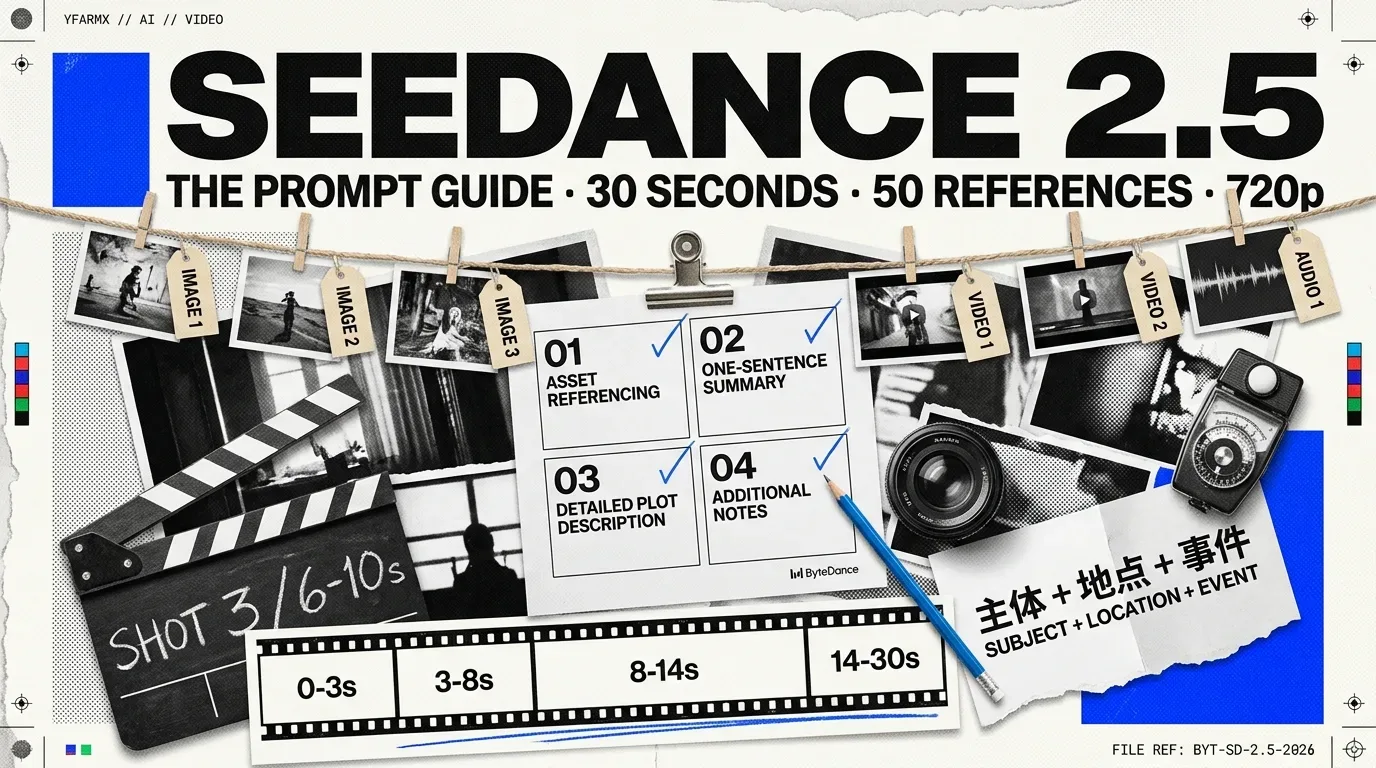
Key facts
- 7 Aug 2026doc 2607689
- Guide published
- 30sup from 15s
- One pass
- 720p480p or 720p only
- Resolution
- 5030 image · 10 video · 10 audio
- Reference assets
- 24 fpsfixed
- Frame rate
- 7 Aug 2026publication day
- Checked
ByteDance put its own prompting method for Seedance 2.5 in writing on 7 August 2026, in English on BytePlus and in Chinese on Volcano Engine. It is a four-block document, not the six-slot formula circulating in blogs, and it comes with a numbering scheme for reference assets, integer-second timestamps, a named camera vocabulary and a deliberately narrow rule about what you are allowed to ask for negatively.
Checked on 7 August 2026, the day ByteDance published the guide. Every quotation below is from ByteDance's own documentation, in English on BytePlus ModelArk or in Chinese on Volcano Engine Ark. Both docs sites render from JavaScript, so a plain fetch returns an empty page: the text lives in the window._ROUTER_DATA payload of the served HTML.
ByteDance published a prompting guide for Seedance 2.5 on 7 August 2026, a week after the model itself launched. It went up twice on the same morning: as Dreamina Seedance 2.5 prompt guide in English on BytePlus ModelArk at 05:46 UTC, and as Doubao Seedance 2.5 提示词指南 in Chinese on Volcano Engine Ark a few seconds earlier. Same document ID, 2607689, two brand names for one model. A companion page carrying the hard limits went up between them.
The guide is worth reading closely for one reason above the rest: the prompt structure it prescribes is not the structure most people are currently using.
The six-part formula going round is not ByteDance’s
A “six-part formula” has been circulating since 5 August under the heading The Official Seedance 2.5 Prompt Guide: Subject + Action or Event + Scene and Environment + Visual Style + Camera Movement or Cut + Audio. It appears in a Segmind blog post that cites no ByteDance source, and it predates ByteDance’s guide by two days.
ByteDance’s actual instruction is a four-block document. The nearest thing to a formula sits inside it as a single summary line, and its fields are different:
Treat Seedance 2.5 as a visual content producer, and write structured prompts with a visual storytelling mindset.
The Chinese edition puts it as 把 Seedance 2.5 当作一个视觉内容生产者,用导演的思维书写 [ 结构化 Prompt ]: write with a director’s thinking. Four blocks follow.
The four blocks
The structure ByteDance prescribes
Written out, the guide’s four blocks are:
Asset Referencing for R2V. “Clearly identify each image, video, or audio asset by its upload order and intended purpose, such as which asset represents the subject, voice, action, scene, and so on.”One-Sentence Summary. “Subject + Location + Event + Genre/Style + Camera movement…”Detailed Plot Description. A shot sequence or a timeline, either is accepted, with each segment’s visuals, camera movement, action, dialogue and sound effects described.Additional Notes. Picture details that run throughout: camera position, environment, sound, atmosphere.
Numbering your references
Seedance 2.5 takes up to fifty reference assets in one request, and the guide’s position is that the binding between an asset and its role in the story is where multi-reference work succeeds or fails.
As the number of reference assets increases, the mapping and reference relationships between assets become especially important. It is not recommended to provide mapping information only inside the image itself.
The failure it names: write “John” on a character’s reference image, then write “John is at school” in the prompt, and you get duplicated or confused characters. Numbering follows upload order, and every asset gets bound in the text.
Three notations appear across the guide’s own examples, and all three are official:
| Notation | Example from the guide | Where it appears |
|---|---|---|
| Bare | “The knight in Image 1” | Reference tasks, first and last frames |
| Bracketed | “Refer to the camera movement and motion in [Video 1]” | Video editing, 3D clay-model reference |
| At-sign | “based on @Image 1 to @Image 6” | Keyframe reference, video editing |
The Chinese edition also shows a compressed form for grouping, img1-2 是人物 1,对应音频 1: images one and two are character one, who uses audio one. The English edition renders this as “Images 1-2”.
Two binding patterns are worth copying directly. For a character with a voice: “Image 1 is the protagonist Zhang San, and Image 1 uses the timbre of Audio 1.” For borrowing motion from footage: “Strictly refer to the action and camera movement in Video 1, keeping the order consistent with the video.”
Shots, timestamps and the continuity rule
Timestamp response is the headline change from Seedance 2.0. The guide states it directly: Seedance 2.0 “does not respond to timestamps and only responds to shot numbers, while Seedance 2.5 supports integer-second timestamps.”
Thirty seconds, divided
Both dividers are accepted, and they can be combined. Shot 1: headers work, integer-second ranges like 0-3s: work, and the guide’s own worked examples use forms including Shot 3 (6-10s):. Three time-control modes are supported: clear intervals, specific time points, and relative time.
The sizing advice is practical. Under-fill a range and the model invents to cover it; over-fill one and you get excessive cutting or dropped plot.
Locked and unlocked tasks
This concept did not exist in Seedance 2.0, and it explains a class of confusing failure. Every request is sorted into one of five task types, and the type decides whether you still control the output’s shape.
Whether your input takes control of the output
For first and last frames there are two routes with different consequences, and the guide is explicit about the trade. Setting the image role through the first_frame or last_frame parameter locks the output’s aspect ratio to the supplied image. Setting the role to reference_image and naming the frames in the prompt text (“Image 1 is the first frame.”) does not lock the ratio, and the result will be similar to the reference rather than an exact match.
Camera language it already knows
The guide names its accepted vocabulary rather than leaving you to guess, which is the single most useful page in it. These terms can be written directly:
| Category | Terms the guide names |
|---|---|
| Shot size | extreme wide shot, wide shot, medium shot, medium close-up, close-up |
| Camera movement | push in, pull out, pan, track, follow, orbit, dive, pull back, tilt up, handheld shake |
| Camera angle | low angle, overhead shot, first-person perspective |
| Technique | one-shot / long take, Hitchcock zoom (dolly zoom), aerial perspective, FPV, bullet time, handheld shot, speed ramp |
For anything outside that list, the instruction is to convert it into [term + descriptive explanation]. The guide’s own example: “Rack focus: the focus of the frame shifts smoothly, the trees in the foreground that were sharp become blurred, and the figure in the background gradually comes into focus.”
Transitions get the same treatment, with the trigger point and the method both written out. The Chinese edition’s example is 第 5s 快速向左横移转场(向左擦除+自然叠化): at five seconds, a fast leftward lateral transition, wipe left plus a natural dissolve.
Audio, dialogue and subtitles
Two notations exist across the pages published that morning, and they are not the same. The prompt guide writes dialogue inside a shot block:
Shot 3 (6-10s): Facial close-up. The elderly woman looks reluctant to part.
Dialogue (elderly woman): "Fly safe, my child. Come back to me."
The companion tutorial gives a bracket scheme instead: () for music, <> for sound effects, {} for dialogue and 【】 for subtitles, with a recommendation to name the language before any non-Chinese dialogue. Both come from ByteDance, published within a minute of each other, and neither page mentions the other. The shot-block form is the one the guide’s worked examples actually use.
Audio is on by default. The generate_audio boolean defaults to true, and with it the model produces matching voice, sound effects and background music from the prompt and the visuals together. Lip sync is demonstrated in ByteDance’s own multilingual example rather than stated as a specification.
Negative control is deliberately narrow
There is no negative-prompt field. Negation is written into the prompt, and the guide sanctions it for two things only: subtitles and audio.
The negations ByteDance documents
Do not add subtitles.Subtitle suppression. The Chinese edition’s variant is 不额外加入对白字幕, “do not additionally add dialogue subtitles”.No subtitles.The short form, given as the guide’s second example.No BGM; generate only environmental sounds and action sounds.Fine-grained audio control. Sound effects, background music and dialogue can each be suppressed separately.No audio.Silence. The Chinese original is 不要任何声音, “no sound at all”.
Everything else should be phrased as what you want rather than what you do not. One inconsistency to know about: the guide's own multi-panel storyboard example carries a broad [Strictly exclude] block listing colour, medium and rendering exclusions, which is wider than the "subtitles and audio" rule allows. ByteDance does not reconcile the two, and does not say whether that bracket is honoured syntax or an example that happened to work.
The API is 720p, whatever the marketing says
Seedance 2.5 does not generate 4K through the API, and it does not generate 1080p. BytePlus’s reference is unambiguous: “Dreamina Seedance 2.5: Default 720p; supports 480p and 720p.” The resolution table tags 1080p as unsupported on 2.5 and restricts 4K to Seedance 2.0 alone. On maximum resolution the API for 2.5 sits below the API for 2.0.
The 4K and 60 fps figures in circulation come from the consumer Dreamina product page, which sells both as premium subscription features alongside a beta mode that stretches a clip to 180 seconds. None of the three appears in the model API. ByteDance has not published how the consumer 4K path relates to the model’s own output, so read a 4K claim as a statement about the Dreamina product rather than about Seedance 2.5 itself.
The limits, as documented
| Parameter | Seedance 2.5 | Notes |
|---|---|---|
duration |
4 to 30 seconds, or -1 | Default -1, the model chooses. Seedance 2.0 was 4 to 15 |
resolution |
480p, 720p | Default 720p. No 1080p, no 4K |
ratio |
16:9, 4:3, 1:1, 3:4, 9:16, 21:9, adaptive | Forced to adaptive on editing, extension and first-frame tasks |
| Frame rate | 24 fps | Fixed, with no output parameter |
| Reference assets | 50 per request | 30 images, 10 videos, 10 audio clips |
| Reference video | 2 to 30s each | Combined total no more than 30s |
| Reference audio | 2 to 30s each | Combined total no more than 30s |
| Output format | mp4, mov | mov is 2.5 only: H.264, YUV 4:4:4, PCM audio |
| Prompt length | 500 Chinese characters or 1,000 English words | Recommended ceiling, not enforced |
At 720p the pixel dimensions are 1280×720 for 16:9, 720×1280 for 9:16, 960×960 for 1:1, 1112×834 for 4:3, 834×1112 for 3:4 and 1470×630 for 21:9.
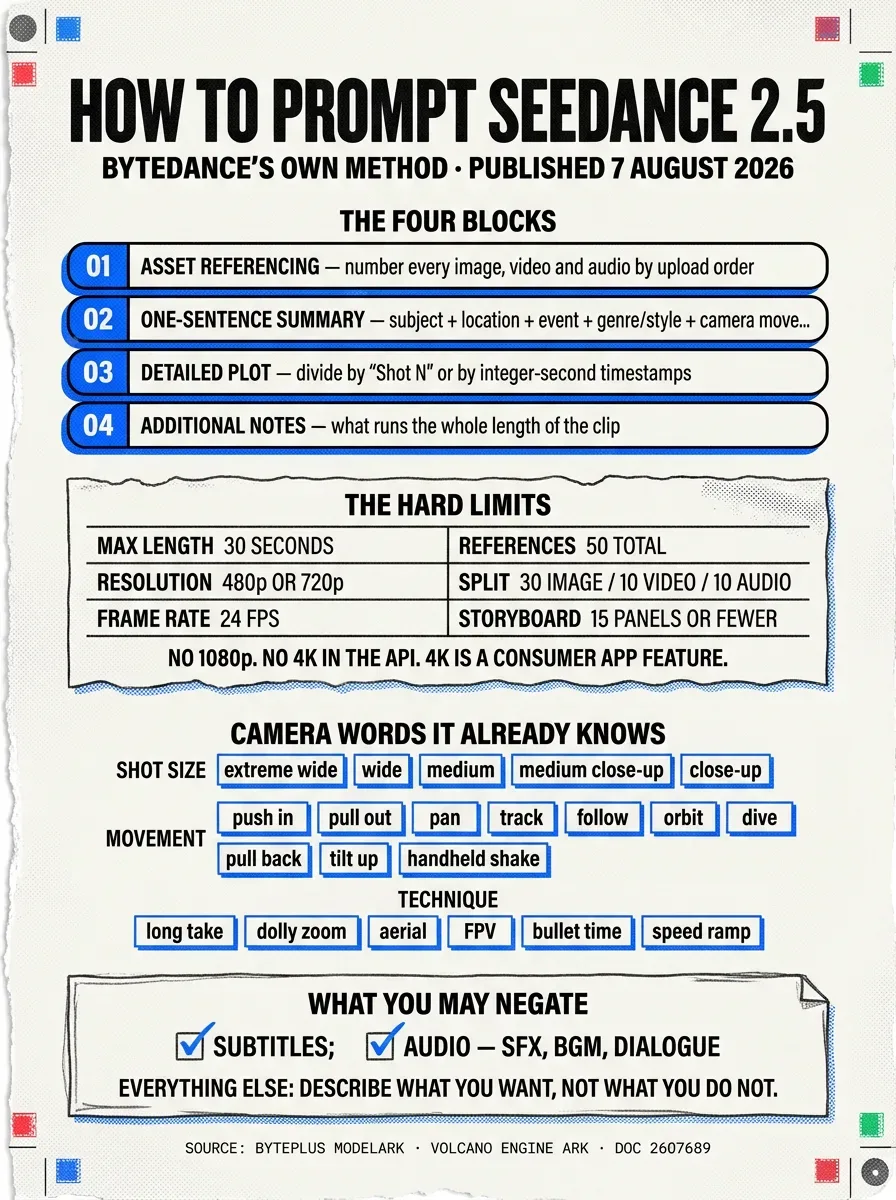
Two restrictions are easy to trip over. Reference images and videos containing real human faces cannot be uploaded to Seedance 2.5 or the 2.0 series. And multi-panel storyboards work best at fifteen panels or fewer: an eighteen-panel input is given as the case that produces still frames or scrambled sequence order.
Start with the skill, not the prompt
Before any prompting advice, the guide’s first section tells you to install a prompt-optimisation skill that ByteDance hosts on its own CDN.
The sd25-pe prompt-engineering skill
npx –yes skills@latest add “https://arkdocs-en.tos-ap-southeast-1.volces.com/skills/” –skill sd25-pe –yesInstalls the skill into a local project. ByteDance’s wording is “We strongly recommend using the Seedance 2.5 Skill to optimize your prompts.”/sd25-pe + your promptRun it in an AI chat box to rewrite a rough brief into the four-block structure.
The skill is hosted on tos-ap-southeast-1.volces.com, ByteDance's own object storage, and is fetched at install time. Read it before running it, as with anything installed from a URL.
Model names and where it runs
One model, no pro, lite or fast tiers. The name differs by platform, and the version stamp is the same on both:
| Platform | Model ID | Region |
|---|---|---|
| BytePlus ModelArk | dreamina-seedance-2-5-260628 |
International |
| Volcano Engine Ark | doubao-seedance-2-5-260628 |
China |
Rate limits on BytePlus are 600 requests per minute with 10 concurrent tasks for enterprise accounts, and 180 requests per minute with 3 concurrent for individuals. The offline flex inference tier is not supported for this model.
Volcano Engine is effectively closed to a UK sole trader: activation needs Chinese real-name verification and a prepaid renminbi balance. BytePlus ModelArk is the international door, and its public endpoint runs in Asia Pacific, so anyone with a data-residency requirement should settle that before building on it.
The resellers, priced
Seedance 2.5 shipped consumer-first on Jimeng AI and Doubao Pro on 31 July, with the API following. Western aggregators picked it up quickly, and their prices for identical output are a long way apart. Every figure below is from the provider’s own pricing page, checked on 7 August 2026.
| Route | Seedance 2.5? | Price, 720p | Notes |
|---|---|---|---|
| Segmind | Yes | $0.2389 per second | $0.1065/s at 480p. Video-to-video $0.1429/s. Audio included |
| fal.ai | Yes | $0.4730 per second | $0.2205/s at 480p. Endpoint bytedance/seedance-2.5/text-to-video |
| Replicate | Yes | Not yet published | Model live at bytedance/seedance-2.5, rate still to be posted |
| AI/ML API | Yes | $8.32 per 1M tokens | Token-billed, matching ByteDance’s own two-tier structure |
| Together AI | Yes | Not yet published | Listed in the catalogue, unpriced |
| Dreamina | Yes | Free daily credits | ByteDance’s own consumer route. No plan table published |
| Krea | Yes | From $9 per month | Full video-model access from the $35 Pro tier |
| OpenRouter | Yes, from 7 August | Not shown in its models listing | Listed as bytedance/seedance-2.5; Seedance 2.0 was $0.06726/s |
| Magnific (was Freepik) | No | Seedance 2.0 and 1.5 Pro | No 2.5 entry |
Segmind runs at roughly half fal.ai’s rate for the same 720p output. At Segmind’s price a 30-second clip, the model’s maximum, costs about $7.17; the same clip on fal.ai is about $14.19. Smaller resellers advertise lower headline rates still, so check the current page before committing to a route.
The OpenRouter row is the one to read twice if you buy inference through credits there. OpenRouter’s models listing has carried Seedance 2.5 as bytedance/seedance-2.5 since 7 August 2026, alongside Seedance 2.0, 2.0 Fast and 1.5 Pro, so a team already holding OpenRouter credits can reach 2.5 from the same account.
Three things to settle before you build on it
The consumer route and the developer route have different licences. BytePlus’s specific terms for video generation treat output as your data and claim no ownership of it, while barring resale of the generation service itself. Dreamina’s consumer terms give you nominal ownership but take a perpetual, irrevocable, sub-licensable licence that extends to other users of the platform, and they disclaim any uniqueness in what you generate. They are also scoped to United States users and name no UK contracting entity. For brand assets, that is the difference between a usable licence and an unusable one.
Provenance is documented for 2.0 and undocumented for 2.5. ByteDance said in March 2026 that Seedance 2.0 output carries C2PA content credentials and an invisible watermark. Its own Seedance 2.5 page says nothing about watermarking, content credentials or labelling, and no 2.5-specific statement has been published. China’s AI content labelling measures, in force since 1 September 2025 under standard GB 45438-2025, bind the Chinese platforms, so Jimeng and Doubao output carries a visible label that the international route may not. Test the actual file rather than assuming.
Inference runs in Asia Pacific. BytePlus ModelArk’s public endpoint is ark.ap-southeast.bytepluses.com, and BytePlus moved that region from Singapore to Johor while keeping the old display label, so the region name does not tell you where compute sits. Its data authorisation agreement allows storage outside the region of use. There is no UK or EU inference region.
What ByteDance still has not put a number on
Three things are genuinely open, and both of the first two are contradicted inside ByteDance’s own materials.
How far a video can be extended. The Seed project page says a clip can be extended “twice”, implying a ceiling near 90 seconds. The API documentation describes extension “over multiple rounds” with no cap. The launch blog claims output “lasting several minutes”. No authoritative figure has been published.
How many shots fit in thirty seconds. Shot count is not a parameter. It is controlled through prompt text alone, and no maximum is stated.
How Seedance 2.5 is built. Seedance 1.0 and 2.0 both have arXiv papers. Seedance 2.5 has none as of today, so architecture, parameter count and training data are undocumented. The launch blog says only that it builds on 2.0’s unified multimodal audio-video joint-generation architecture.
Read the Chinese edition if you can
The two editions are not identical. The Chinese version links a further ByteDance document, Seedance 2.5 提示词模板 (Seedance 2.5 Prompt Templates), hosted on Lark, which the English edition omits entirely. That link currently redirects to a login page and is not publicly readable, so its contents cannot be verified, but its existence tells you there is a per-task-type template set the English guide does not point at.
The English edition is longer in raw text, at roughly 64,000 characters against 29,000, because it inlines fuller example prompts. For the examples, read English. For the complete set of pointers, read Chinese.
For the model itself, its lineage and how it ranks against rivals, see Seedance 2.0 and 2.5. The wider field is in our AI video models hub, and the toolchain for driving these models from a written brief is in animate and edit video with Claude and MCP. New terms are defined in the glossary.
More in Video Generation
All Video →- GuideClaude + MCP for videofrom a written brief to a finished shot
- fal Research and Black Forest LabsFLUX 3 Maxa fast hosted video-generation model
- xAIGrok Imagine Video 1.5 Liteshort video generation at three resolutions
- HeyGenHeyGen Video 1.0short video with native audio
- Google DeepMindGemini Omni 1.1 Flashthe production release of Google's video line
- AlibabaWan 3.0hosted only, with nothing to download