Apple will add Full Disk Access controls, citing AI agents
Apple said on 2 October 2026 it will add controls so Mac users can grant Full Disk Access, which lets an app read every file, mail and browsing history, only with very explicit user action. Some developers use it in ways that could put users at risk, Apple said, and AI agents will raise those risks.

Listen to this articleListen
Apple said on 2 October 2026 that it “will introduce additional controls” on Full Disk Access, the Mac permission that lets an app read every file on the computer, so that users who want to grant it “can only do so with very explicit user action”. “Some developers are using Full Disk Access in ways that could put users at risk,” Apple wrote in a notice on Apple Developer News posted at 16:00 UTC, adding: “As AI agents become increasingly capable and autonomous, the risks associated with this level of access will grow substantially.”
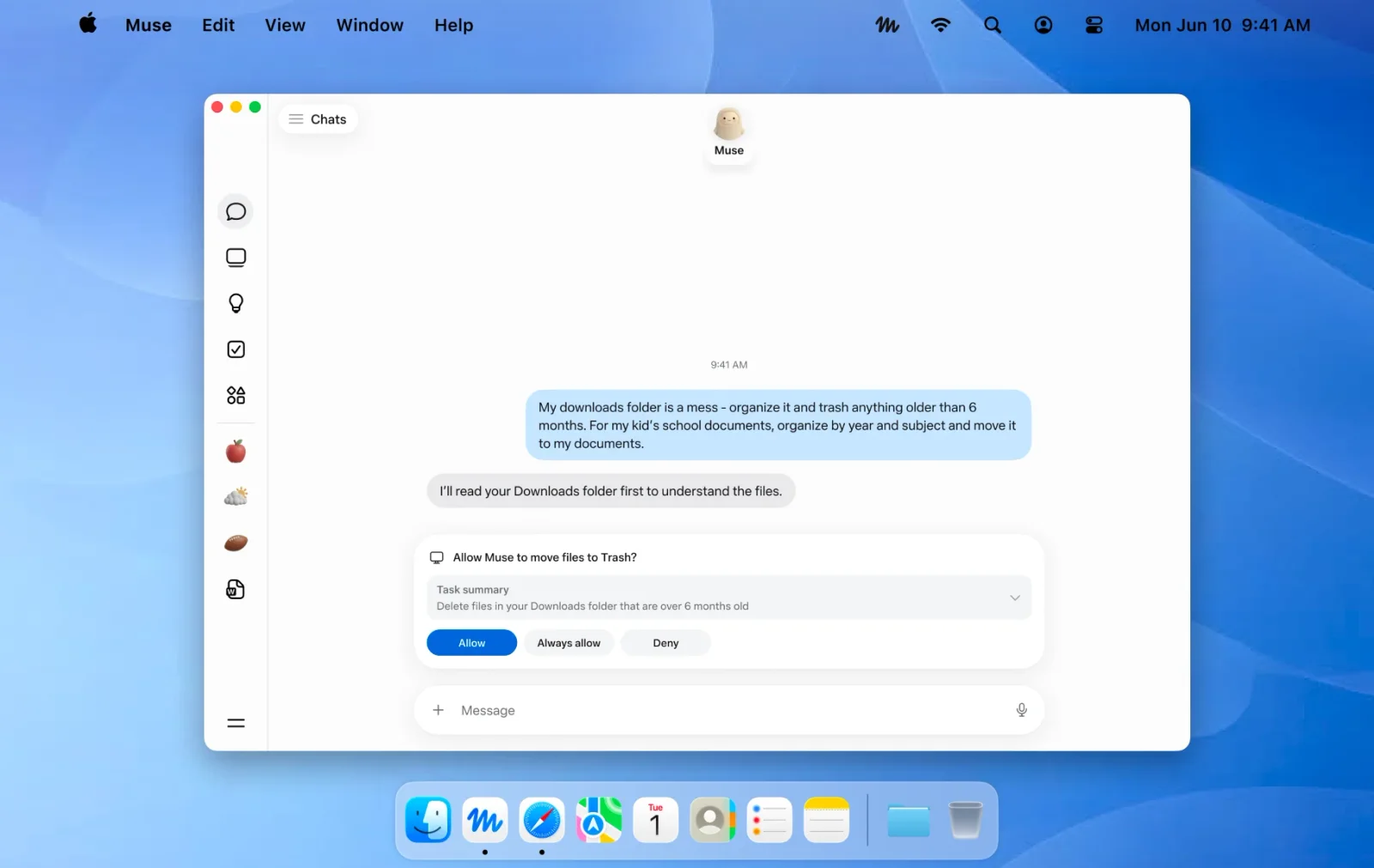
Full Disk Access sits in System Settings under Privacy & Security. Apple’s Mac User Guide says it lets apps “access all files on your computer, including data from other apps (for example, Mail, Messages, Safari, and Home)”. Some AI agents ask for it: Meta’s Muse app for Mac does, so that its agent “can find, read or update files”, in Meta’s words.
What did Apple say on 2 October?
Apple will add controls so that granting Full Disk Access takes very explicit user action, it said in “Updates to Full Disk Access in macOS”, posted on Apple Developer News at 09:00 Pacific time (16:00 UTC) on 2 October 2026. Apple writes that it backs developers’ “powerful APIs” with controls “designed to protect users’ private data”, and that “Full Disk Access largely sidesteps these controls in order to allow backup apps to function properly on the Mac.”
Apple’s complaint is with how some developers use the permission: in ways that expose everything on a user’s Mac, “including files, mail, messages, and even browsing history”, “without users’ full knowledge and understanding”. For communication apps, Apple adds, “this can also compromise the privacy of the people users are communicating with.”
“Going forward, we will introduce additional controls to ensure that users who genuinely wish to grant an app this extraordinary level of access can only do so with very explicit user action,” Apple writes. “Addressing this is critical.” Apple ties the change to AI agents too: as they become more capable and autonomous, it expects the risks of this level of access to “grow substantially”.
Apple flagged the risk from agents to developers in June. Its summary of the WWDC26 Privacy and Security Group Lab, published on 10 June 2026, warns that “Agentic technologies introduce a new category of risk, notably indirect prompt injection”: instructions hidden in content a model reads, rather than typed by its user.
How do you give an app Full Disk Access today?
A Mac user grants Full Disk Access by adding the app by hand in System Settings, under Privacy & Security, the route Apple sets for any app that needs the whole drive. The Mac User Guide gives the steps: choose Apple menu > System Settings, click Privacy & Security in the sidebar, open Full Disk Access, click the Add button, select the app and click Open.
Apple’s Platform Security guide sets two routes side by side. For the Desktop, Documents and Downloads folders, the app itself triggers a macOS prompt. Apps that need the whole drive “need to be explicitly added in System Settings (macOS 13 or later)”, so the user has to change the privacy setting themselves.
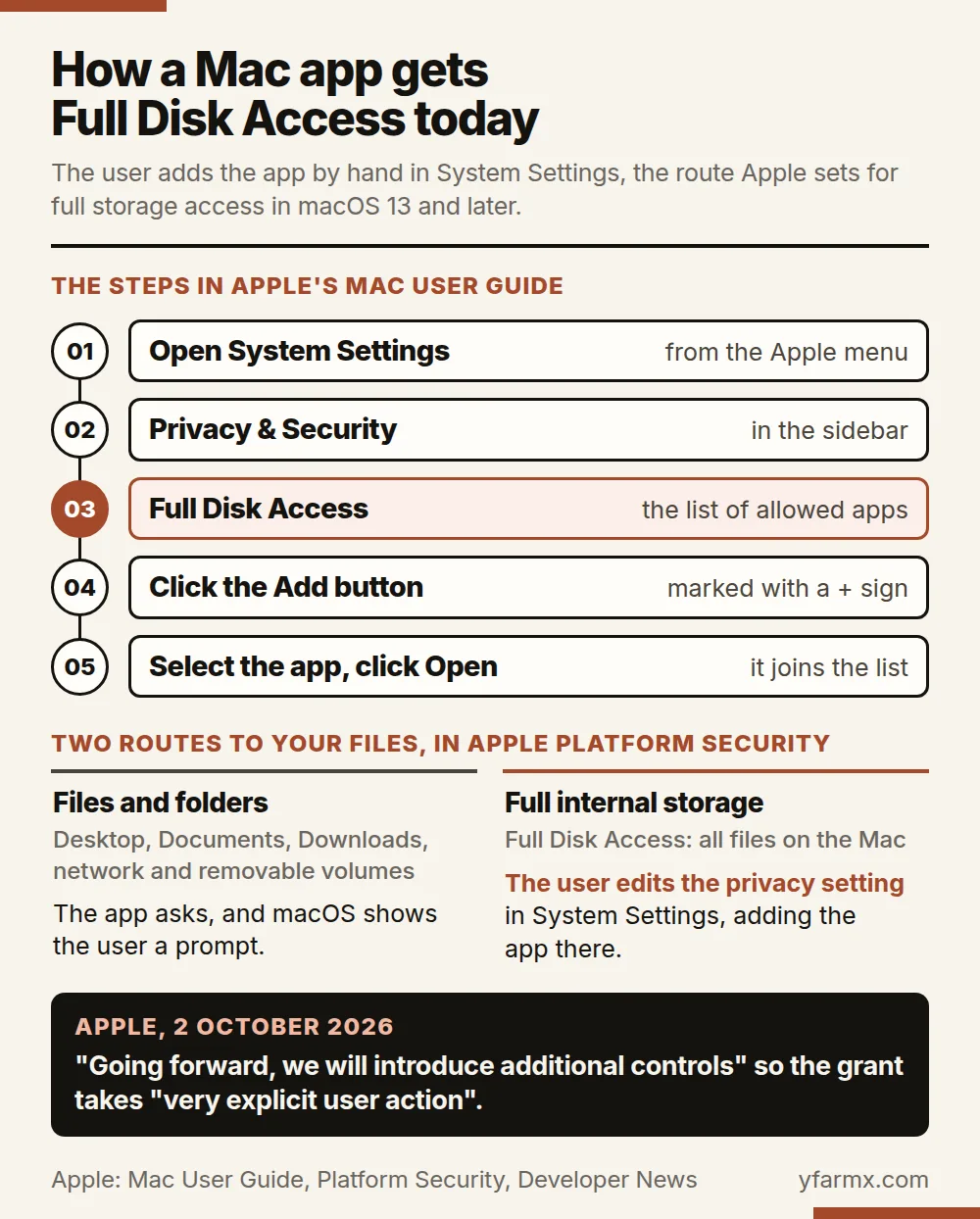
The Full Disk Access list in System Settings is also where a user takes the permission away. Meta’s help centre tells Muse users to open System Settings, go to Privacy & Security “and remove Muse’s permission for Full Disk Access, Automation, or Notifications”.
What can an app with Full Disk Access read?
An app holding Full Disk Access can read all files on the Mac, Apple’s Mac User Guide says, including data from Mail, Messages, Safari and Home, Time Machine backups and “certain administrative settings for all users on this Mac”. For companies that manage their Macs centrally, Apple’s device management documentation has a key, SystemPolicyAllFiles, that gives an app access “to all protected files, including system administration files”.

Which AI agents ask for Full Disk Access?
Meta’s Muse app for Mac asks for Full Disk Access “so your agent can find, read or update files”, according to Meta’s help centre; Muse released the Mac app on 17 September 2026. Meta says the permission “covers all the files on your Mac, but your agent only uses the files and app information you ask it to work with”. Muse also asks for Automation, to act in apps that keep information on the Mac, such as sending a message, and for Notifications. “Computer use gives your agent broad reach across your Mac, so only grant access you’re comfortable with,” the help page adds.
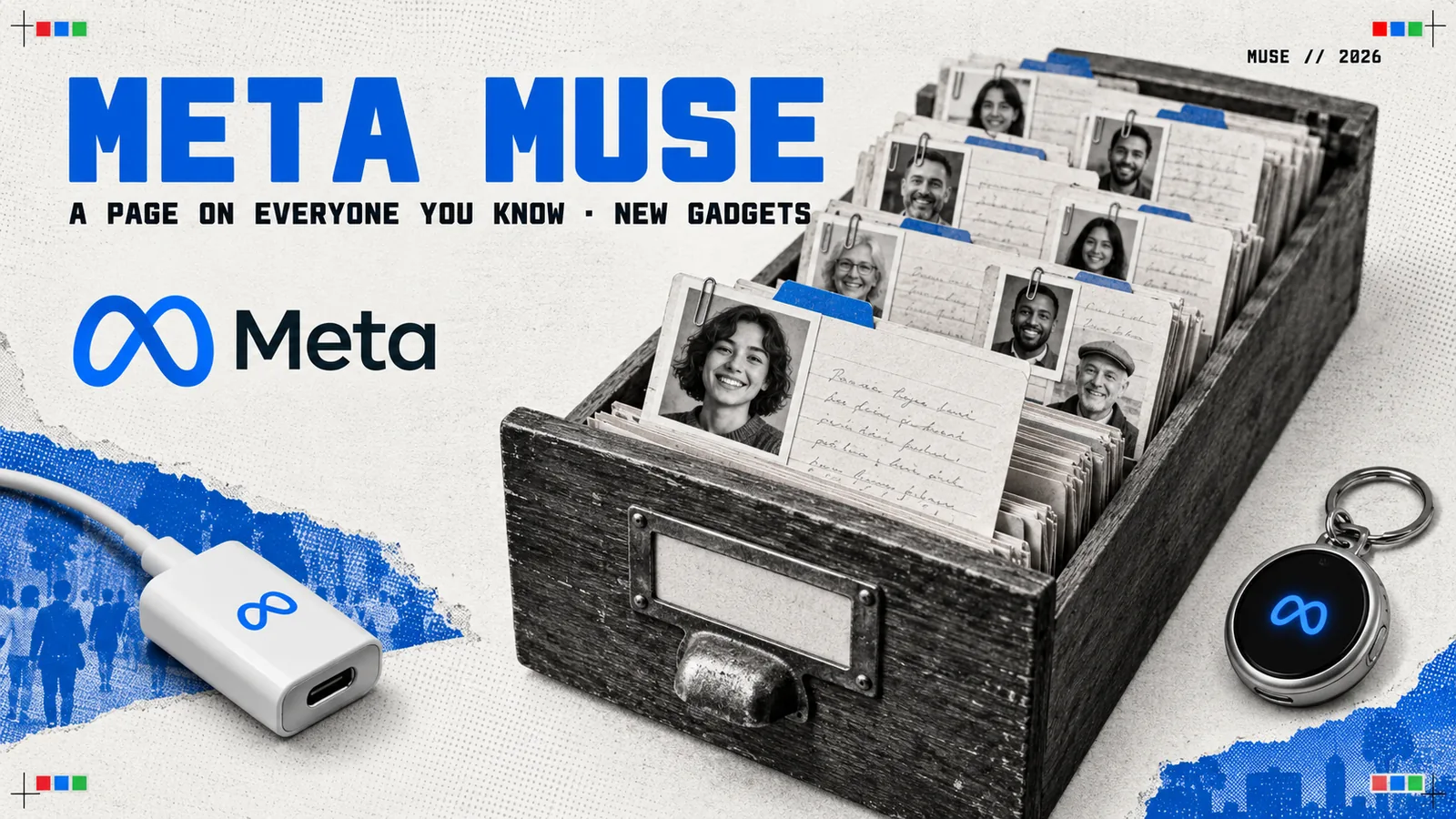
Meta spokesman Andy Stone replied on X on 30 September 2026 to a tech news site’s post claiming that Muse was taking users’ Apple Messages and uploading them to the cloud, even when told not to. “Let’s set the record straight: the Messages integration in the Muse app for Mac is entirely opt-in,” Stone wrote. “You have to enable both Full Disk Access and the Messages connector for Muse to be able to read your Messages content.” Muse’s own instruction files also tell it to keep a page on each person in a user’s life.
The four agents ask for these macOS permissions, as each maker describes them:
| App | macOS permissions its maker describes | Where it says so |
|---|---|---|
| Meta Muse for Mac | Full Disk Access, Automation and Notifications | Meta help centre |
| Perplexity for Mac | For file access, Full Disk Access when a feature needs it, plus folder prompts | Perplexity help centre |
| OpenAI ChatGPT desktop app, with Codex | A macOS approval for folders such as Music, Downloads and Desktop; Screen Recording and Accessibility for Computer Use | Troubleshooting and Computer Use guides |
| Anthropic Claude Code computer use | Accessibility and Screen Recording | Claude Code docs |
OpenAI’s troubleshooting guide says that if Codex “needs to read your home directory, macOS prompts you to approve access to those folders”. OpenAI’s Computer Use guide asks for Screen Recording “so ChatGPT can see the target app” and Accessibility “so ChatGPT can click, type, and navigate”. Anthropic’s computer-use guide asks for Accessibility, so Claude can click, type and scroll, and Screen Recording, so it can see the screen, and flags “apps that grant shell, filesystem, or system settings access” before a user approves them. Apple’s Mac User Guide describes Accessibility as the setting that lets apps “run scripts and system commands to control your Mac”.
Agents in the browser reach for the same kind of access: AI browsers click and type inside a user’s logged-in sessions, and Hermes Agent browses with a copy of a user’s real logins.
macOS 27 blocks apps from other developers’ app data by default
macOS 27 Golden Gate, released on 14 September 2026, blocks apps by default from files in other developer teams’ app data containers and app group containers, Apple’s release notes say, and leaves the user to manage exceptions in Privacy & Security. Access that used to bring up a prompt is now refused: “such accesses are denied by default and can be managed by the user in Privacy & Security settings”. The same release changed three more privacy controls:
| macOS 27 change | What Apple says |
|---|---|
| XProtect, the Mac’s built-in malware defence | It “may now restrict access to app data that is commonly targeted by malicious software” |
| The TCC database, where macOS records privacy permissions | “Apps can no longer access the local TCC database directly” |
| Accessibility granted through a company’s device management, using the deprecated Accessibility key | The user sees a notification once for each app and can switch the permission off in System Settings |
Apple’s enterprise notes for macOS 27, published on 28 September 2026, say that notification exists so users “are aware the app can access their data, monitor their keyboard and websites, record their screen, and more”.
Full Disk Access still has a place in Apple’s own fixes: its workaround for a Files & Folders known issue in macOS 27 is to “grant Full Disk Access to the process for the duration of the requirement”. On the coming controls, Apple says it is “committed to ensuring users clearly understand these risks before granting such access, so they can make informed decisions about their own data and privacy.”
Questions people ask
- What is Full Disk Access on a Mac?
- Full Disk Access is a macOS privacy permission that lets an app read all files on the computer, including data from other apps such as Mail, Messages, Safari and Home, Time Machine backups and certain administrative settings for all users, according to Apple's Mac User Guide. Apple says the permission largely sidesteps the controls that protect users' private data, so that backup apps can function properly. A user grants it in System Settings, under Privacy & Security, then Full Disk Access, by adding the app.
- What did Apple announce about Full Disk Access on 2 October 2026?
- On 2 October 2026 Apple posted a notice on Apple Developer News saying it will introduce additional controls so that users who genuinely wish to grant an app Full Disk Access can only do so with very explicit user action. Apple said some developers use the permission in ways that could put users at risk, exposing files, mail, messages and browsing history without users' full knowledge, and that the risks will grow substantially as AI agents become more capable and autonomous.
- Which AI agents ask for Full Disk Access on a Mac?
- Meta's help centre says its Muse app for Mac, released on 17 September 2026, asks for Full Disk Access so the agent can find, read or update files, alongside Automation and Notifications. Perplexity's help centre lists Full Disk Access among the permissions its Mac app requests when a feature needs it. For computer use, OpenAI's ChatGPT desktop app, which runs Codex, and Anthropic's Claude Code ask for Screen Recording and Accessibility, the setting Apple says lets apps control the Mac.
Sources
- Apple Developer News: Updates to Full Disk Access in macOS, 2 October 2026developer.apple.com
- Apple Developer News feed, item dated 2 October 2026, 09:00 PDTdeveloper.apple.com
- Apple Mac User Guide: Change Privacy & Security settings on Macsupport.apple.com
- Apple Platform Security: Controlling app access to files in macOSsupport.apple.com
- Apple Developer Documentation: Privacy Preferences Policy Control services, SystemPolicyAllFilesdeveloper.apple.com
- Apple: macOS 27 Golden Gate release notesdeveloper.apple.com
- Apple Support: What's new for enterprise in macOS Golden Gate 27, 28 September 2026support.apple.com
- Apple Support: Apple security releasessupport.apple.com
- Apple Developer: Privacy and Security Group Lab, WWDC26, 10 June 2026developer.apple.com
- Meta Help Center: How Muse works with files and apps in your Macmeta.com
- Meta: Download Muse for Macai.meta.com
- Muse on X: Muse is now available on Mac, 17 September 2026x.com
- Andy Stone on X: the Messages integration in the Muse app for Mac, 30 September 2026x.com
- Perplexity Help Center: Get started with the desktop appsperplexity.ai
- OpenAI: Computer Use in the ChatGPT desktop applearn.chatgpt.com
- OpenAI: ChatGPT desktop app troubleshooting, Codex and macOS folderslearn.chatgpt.com
- Anthropic: Claude Code computer usecode.claude.com